Every exam leaves a receipt.
The exam should look like the work. The evidence should stand up to scrutiny.
- On-device
- Integrity inference runs locally. Raw video never leaves the machine.
- One root
- One Merkle root per session, anchored where anyone can check it.
- About 15 MB
- Installs on Windows, macOS and Linux, with a WebAssembly fallback.
NOMEVEX
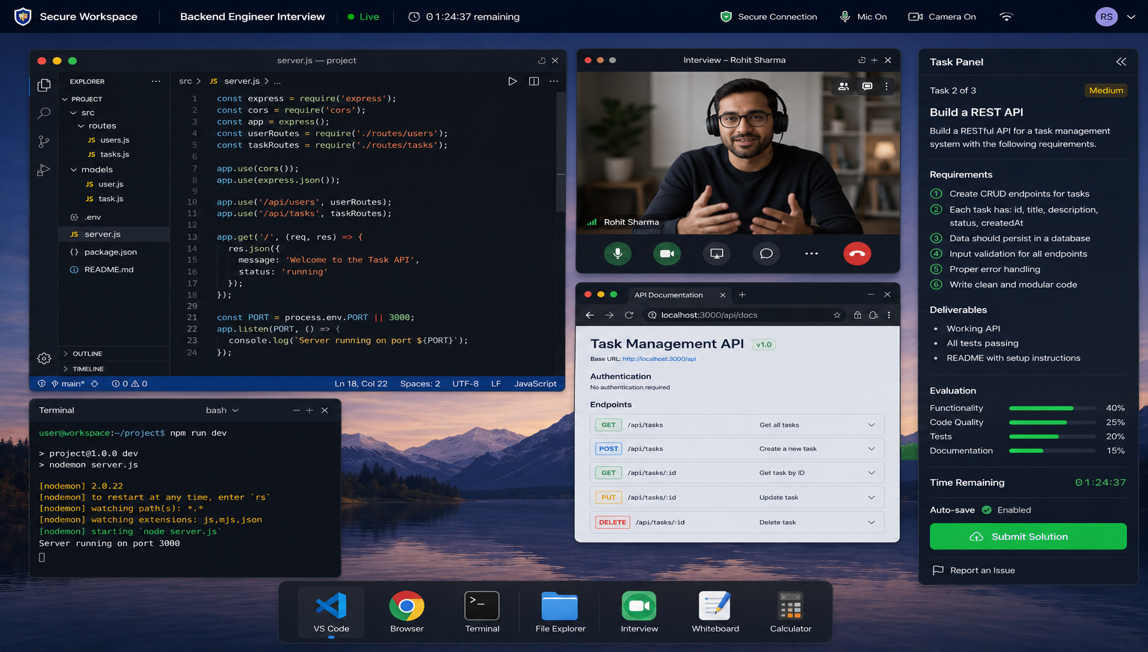
- 00:00:01 isolation OS lockdown verified
- 00:00:04 sealed Rulebook hashed
- 00:12:40 blocked Paste from outside
- 00:14:02 logged On-device assistant (allowed)
- 00:31:18 blocked Switch to another app
- 00:45:00 sealed Merkle root anchored
Go ahead. Try to break it.
You are twenty minutes into a data science exam. Try to cheat, then try to rewrite history. Each event is chained to the one before it.
Candidate's desk
Evidence log
session recording- t+00:00:00 sealed
Session opened, OS lockdown verified
parent none · hash c6c01bf3
Try a few actions, then try to rewrite one.
Every session has a heartbeat.
Hover or tab to a spike to read the evidence behind it.
Before, during, after. One connected record.
Set the rules, let people work, then check what happened. All three share one seal.
BeforeYour rules
Choose the tasks, the apps, the AI policy and the accommodations. The rulebook is sealed with the session.
rulebook sealed · ai_assistant on-device onlyDuringReal tools
The device is locked down at the OS level. Candidates work in the apps their job actually uses.
os lockdown verified · 0 flagsAfterProof
Reviewers read the rules that applied, not a policy that changed afterwards. Employers verify without a private recording.
merkle root anchored · public
Write the rulebook
Flip a rule and watch the seal change. A different rulebook can never share a seal.
RULEBOOK
Don't trust us. Verify it.
This receipt was sealed before the page loaded. Change any character, then check it against the sealed head.
Receipt
Sealed head
5d279279f5b85e8aaeeb98cfb7933afea9ae5e93829774526b1675e670329661
Verified. 6 blocks, head matches.
Digest: SHA-256
Beyond the score: what they know, and why.
Verified results map to concepts. Select a bar to trace the gap.
41%
Rotational motion
The prerequisite gap traces to torque and cross products. Three of the four stuck students share it.
Fix the Energy and work gap first; it is upstream of this one.
One platform. Four frontiers.
The same record, adapted to how each world evaluates people.
See learning in real-world work: secure exams, practical coursework, and learning intelligence that traces where a mark was lost and why.
NOMEVEX
- isolation Lab environment locked
- logged IDE and spreadsheet allowed
- sealed Submission anchored
Connect to your existing stack.
Works with the tools you already run, with no rip-and-replace.
- LTI 1.3 LMS handoff and grade passback
- SCORM Package import and export
- SAML 2.0 Institution single sign-on
- Canvas LTI 1.3 deep integration
- Okta Identity and provisioning
- Google Workspace SSO and Drive workflows
- Microsoft 365 Entra ID and Teams workflows
- Your own stack Open APIs and SDKs, no vendor lock-in
Deployment Self-hosted ·Hybrid ·Managed cloud
Questions before you publish.
Assessment, privacy, deployment and integration details.
Talk to our team Browse the docsWhat is Nomevex?
Nomevex is an end-to-end assessment platform that combines AI-powered proctoring, the NOMEVEX Assessment Environment (NAE) secure exam browser, cryptographic verification, and adaptive learning analytics in one integrated system. It replaces separate proctoring, lockdown-browser, grading, and analytics tools with a single platform.
How does Nomevex differ from traditional proctoring?
Traditional proctoring streams raw video to centralized servers. Nomevex runs AI inference locally on the candidate's device — only cryptographic proofs and integrity metadata leave the machine. This improves privacy, cuts bandwidth, and delivers verifiable integrity without invasive surveillance.
What is the NOMEVEX Assessment Environment (NAE)?
NAE is our native secure exam browser, built in Rust for Windows, macOS, and Linux. It locks down the testing environment at the OS level — blocking unauthorized apps, screen sharing, and USB devices — while signing evidence cryptographically. NAE stands for NOMEVEX Assessment Environment.
How does Nomevex improve learning outcomes?
Nomevex analyzes performance at the concept level — not just scores. It identifies prerequisite gaps, common misconceptions, and class-wide patterns, giving instructors actionable recommendations like targeted practice and revision sessions.
Is the platform GDPR and FERPA compliant?
Yes. Privacy is core to our architecture. We support GDPR data subject access requests, configurable data retention, purpose limitation, and data minimization by default. FERPA compliance is built into data handling policies, with signed audit trails for legal defensibility.
Do students need to install software?
For proctored exams, students install NAE — a lightweight cross-platform app built in Rust (~15MB). A WebAssembly fallback is available for managed or restricted devices. Learning-analytics features work through the web portal with no installation.
What operating systems are supported?
NAE supports Windows, macOS (Intel and Apple Silicon), and Linux. ChromeOS support is on the roadmap. The rest of the platform is a web application that works in any modern browser.
Can coaching institutes use Nomevex?
Absolutely. Coaching institutes use NAE for secure mock exams and weekly tests, while the analytics engine identifies concept-level weaknesses, prerequisite gaps, and common misconceptions. Instead of average scores, instructors see precisely which concepts students struggle with and what to do about it.
Can we run this on our own infrastructure?
Yes. Self-hosted, hybrid, and managed cloud deployments are supported — see our Deployment Guide. The platform is built as a modular monolith that can run on your own servers or in your cloud. Open APIs and SDKs prevent vendor lock-in.
How does the cryptographic verification work?
During an exam, every event is hashed and combined into a Merkle tree. The Merkle root is periodically anchored to a public blockchain or transparency ledger. Anyone can verify session integrity independently using the verification portal — without accessing private recordings.
Does Nomevex issue verifiable credentials?
Yes. Nomevex issues blockchain-anchored digital diplomas and certificates that employers can verify independently, with revocation support. The verification portal hands back the result as a JSON document you can keep and re-check. It's an end-to-end path from exam completion to verified credential.
Seal this visit.
Every step you take here is chained, just like an exam. Book a demo and we will walk a session from your own institution through the rulebook, the lockdown and the sealed record — and you decide whether the evidence holds up.
YOUR VISIT
- Nothing chained yet — scroll, switch a rule, or try to forge a receipt.